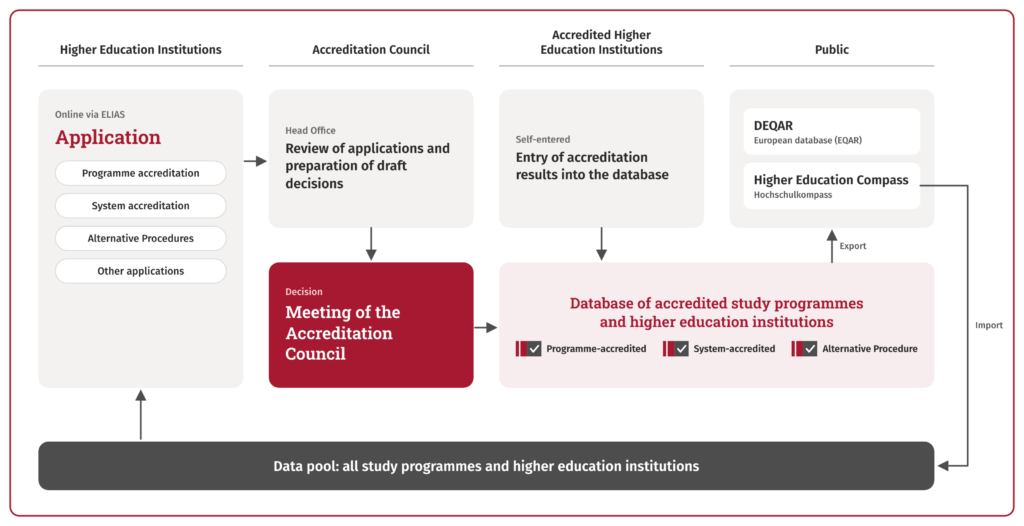
The system comprises two main areas:
- Application processing system – This is where accreditation applications are created, submitted and processed.
- Public database – It provides a transparent overview of all accreditation decisions and contains information on accredited study programmes and higher education institutions.
How do I register in ELIAS?
In order to be able to submit applications for accreditation in ELIAS, the higher education institution submitting the application must first register in the system. New users for a higher education institution are set up in ELIAS by the user administration of the higher education institution.
This is how registration works:
- Contact the user administration of your university.
- You will receive a registration link by e-mail (valid for 24 hours).
- Activate your account and log in with your e-mail address and password.
What does “user management” mean?
User administration is a special role in ELIAS. It authorizes not only the application, but also the creation and blocking of users. As a rule, the first registered person at a higher education institution takes on this role.
- There can only be one user administrator per university.
- This person is also the contact person for important notifications, e.g. annual fee notifications.
If you do not know who the user administration is, please contact elias@akkreditierungsrat.de.

Registration
You can register for ELIAS here:
Register in ELIAS
Application
Once you have logged into the system, you have the option of submitting applications for program or system accreditation.
All details on the application
Accreditation database
Results on accredited study programmes and higher education institutions can be found in the Accreditation Council’s central database:
Call up database

